
Cart is empty


Coming back to NAILSMADE? Here is what has changed
Over the last two months, we have reworked several familiar steps at NAILSMADE: finding products, choosing a shade, reading a product page and placing an order. We have added colour matching from a photo and updated the account area. Here is what you can try on your next visit.
Find a shade from a photo or the palette
Have a photo of a manicure, a dress or a look you want to match? Open the colour picker. There are four ways to choose a colour:
- Use the palette and adjust the saturation.
- Add your own photo and select a point on the image.
- Browse catalogue shades: choose a colour family, then a swatch.
- Click the colour strip below the tools.
The store lists shades from closest to your chosen colour. View them together or grouped by brand, then narrow the results by product type, availability and price. For example, try the preset for red gel polishes.
The picker is still in beta. Photos, lighting and screens affect how colours look, so the results cannot guarantee an exact match to the physical product. Use it to find options worth a closer look.
Search without remembering the full name
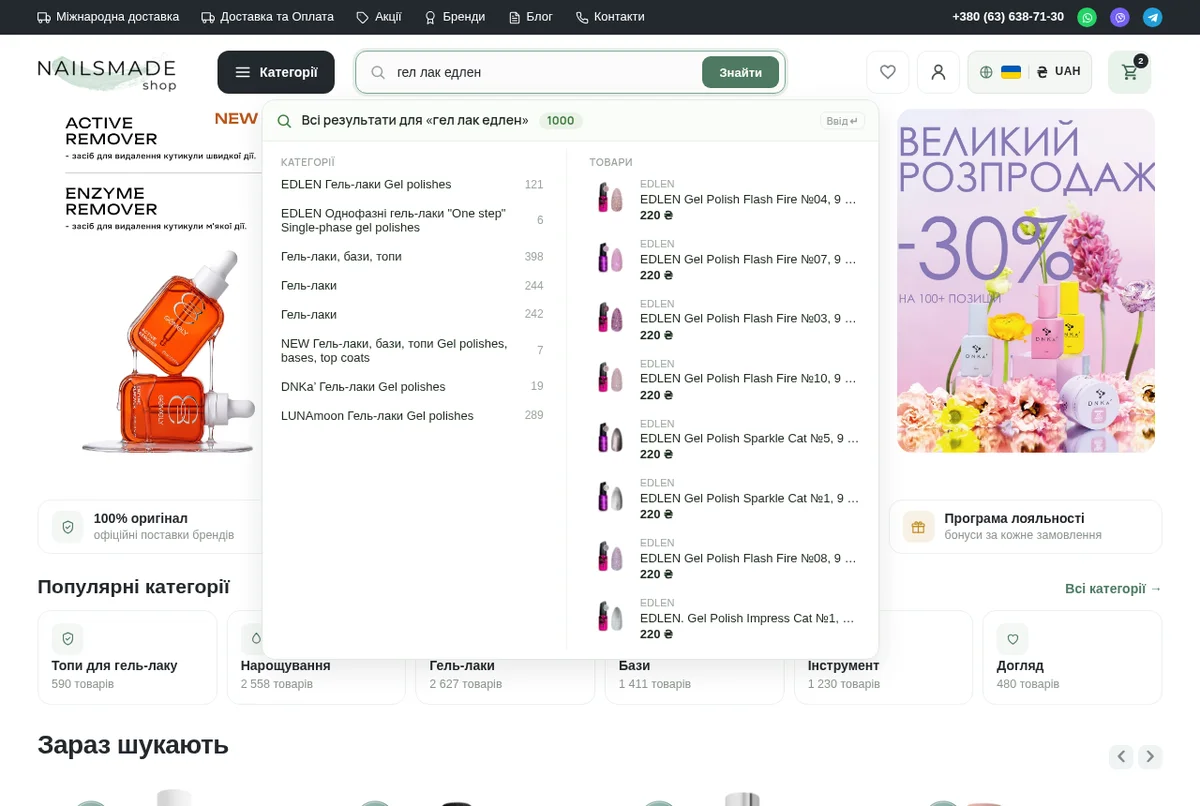
Start typing a product name, brand or SKU. Suggestions show products with photos and prices, as well as relevant categories and brands.
Search handles some imperfect queries too: the Ukrainian phrase "гел лак едлен" finds EDLEN, and "heylvoe" returns HEYLOVE. The older GA&MA spelling also works. You do not need the full name from the bottle; if the results miss the mark, add a brand or another word.
Narrow the catalogue to what you need
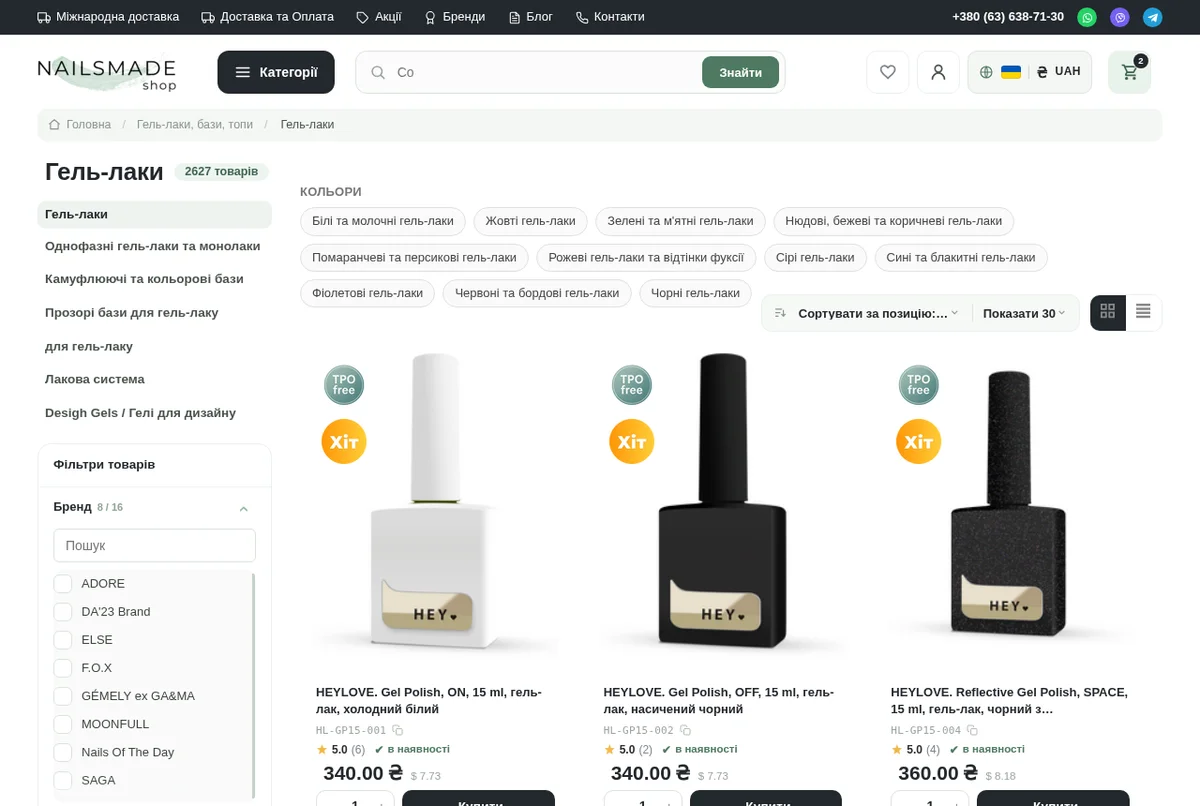
If you know the colour family, try a ready-made collection such as nude, beige and brown gel polishes. Links to other colours are in the gel polish category.
On a phone, open the filters and categories panel. Select several criteria and apply them with the results button. Longer lists have a search field. The available filters depend on the category.
If you shop by manufacturer, start with the brand list or go straight to HEYLOVE, for example.
Compare sizes on the product page
We have updated the gallery, description and product details. On a phone, you can swipe through the photos. Where a product has other sizes or formats, you can switch between them on its page.
For example, HEYLOVE Tint base FIRE has a selector for 15 and 30 ml. Where the volume is known, we also show the price per millilitre to help you compare pack sizes.
Arrange delivery to yourself or someone else
At checkout, choose a saved address or enter a new one. If the order is for another person, use the separate recipient fields; your buyer contact details stay separate.
Delivery options depend on the country. International options include Nova Post Global, Standard Post and EMS. Payment choices include online card payment, monopay, cash on delivery, an IBAN transfer and arranging payment with a manager. Check the options available for your order at checkout.
Keep orders and addresses in your account
Your account brings together orders, their statuses, your loyalty level and saved addresses. You can filter orders by status or repeat an order. Shipments with a tracking number have a link to check it with the carrier.
The sign-in page offers Google, Apple, Facebook and Telegram. You can also set up a passkey on a compatible device and confirm sign-in with Face ID, a fingerprint or a PIN. Password sign-in remains available.
Choose the store language and display currency manually. Prices can be shown in Ukrainian hryvnias, US dollars or euros; check the actual payment currency at checkout.
Check your loyalty discount
The programme uses your purchase history over the last 12 months. Your account shows the amount currently counted and your level.
| Amount used to determine your level | Discount |
|---|---|
| From UAH 3,000 | 5% |
| From UAH 10,000 | 7% |
| From UAH 20,000 | 10% |
| From UAH 50,000 | 12% |
| From UAH 100,000 | 15% |
At checkout, the value of the products in your current cart also counts. If that amount, together with your history, reaches the next threshold, the higher rate can apply to this order.
Sign in or enter the email address or phone number from your previous orders so the store can find your history. You do not need to activate the programme or enter a code.
Some products and categories are excluded. Loyalty discounts also do not apply alongside a promo code or gift certificate. Check the discount and final total in your cart before confirming.
For help choosing a product, checking an order or understanding your discount, email support@nailsmade.store.
Frequently Asked Questions
Do I need an account to get a loyalty discount?
Registration is optional. Enter the email address or phone number from your previous orders at checkout. If you already have an account, you can sign in.
Why did my level go down after a break?
The programme uses the last 12 months. Older purchases gradually fall outside that period, so the amount counted and your level can decrease.